
DataraDB
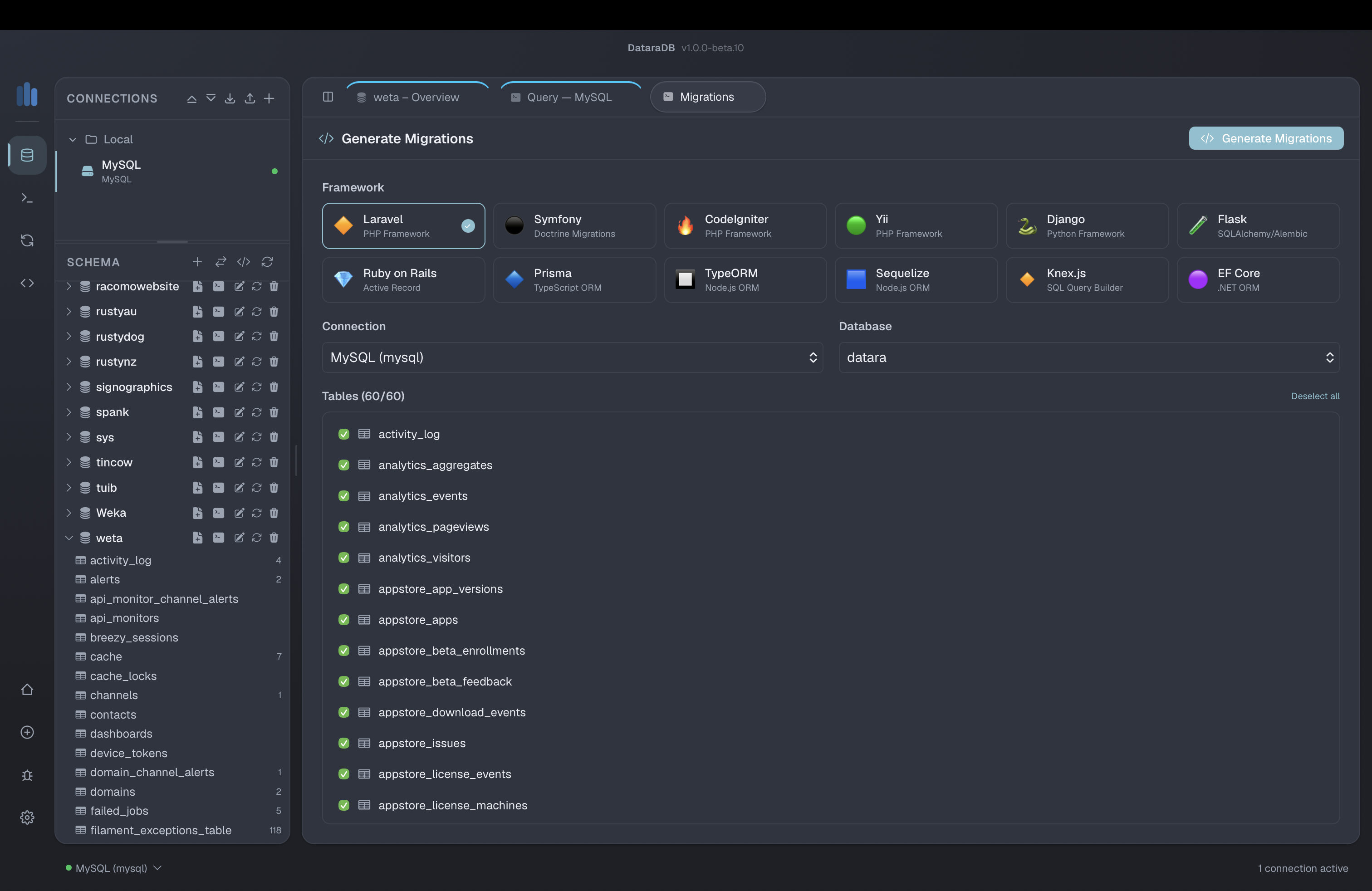
DataraDB is a powerful, lightweight database management tool built for developers, DBAs, and data teams who work across multiple database engines. With native support for PostgreSQL, MySQL, SQLite, MongoDB, Redis, SQL Server, and Oracle, DataraDB lets you manage all your databases from a single, beautifully crafted interface. Connect securely via SSH tunnels and SSL/TLS, write and save queries with full syntax highlighting, browse schemas visually, and let the built-in AI assistant generate SQL for you. Features like schema comparison, data sync, visual query builder, and SQL file import make DataraDB a serious alternative to tools costing many times more.
Designed to stay out of your way, DataraDB is a native desktop application with a tiny footprint and fast startup — no bloat, no browser tabs eating your memory. It runs natively on macOS with a crisp, responsive interface that supports both dark and light themes. Whether you're quickly inspecting a local SQLite file, managing a production Postgres cluster, or syncing schema changes across environments, DataraDB gives you the tools you need without the overhead you don't. Export data to SQL or CSV, import from SQL dump files with intelligent parsing, and keep your workflow moving — all from an app that feels as fast and focused as your terminal.
Release History
Nov 10, 2026
Fix
- SSH tunnels to servers with several host keys — DataraDB no longer reports a trusted server's key as "changed" when the server offers more than one key type (for example Ed25519 and ECDSA). It now asks for the key type already in your known_hosts, as OpenSSH does, so hosts that work in DataraSSH or the terminal connect in DataraDB too.
New
- Report an Issue opens as a window over the app instead of a new tab.
- Licence devices are now listed by name and platform on your datara.studio account, so you can tell your machines apart.
Nov 7, 2026
Fix
- Database Sync works on every SQL database — Sync now runs correctly on MySQL, MariaDB, PostgreSQL, SQL Server, Oracle and SQLite, not just MySQL.
- Sync applies only the changes you tick — unticked differences are no longer applied.
- Safer data sync — a WHERE filter combined with "delete extra rows" no longer deletes target rows outside the filter, and failed statements are reported instead of counted as successes.
- Real transactions for sync — "Use transaction" now rolls back every change if any statement fails.
- Exact values when syncing data — dates keep their fractional seconds, and binary data and text containing backslashes copy correctly. The update count is now accurate.
- Framework migrations rebuilt — the migration generators for Laravel, Symfony (Doctrine), CodeIgniter, Yii, Django, Flask (Alembic), Rails, Prisma, TypeORM, Sequelize, Knex and EF Core now produce files that run on the current framework releases, keeping unique indexes, composite keys, defaults and cascade rules.
- Accurate table details — PostgreSQL column lengths, MySQL and PostgreSQL foreign-key cascade rules, SQL Server defaults, SQLite foreign-key names and Oracle schema selection are now read correctly.
New
- Ignore columns and compare-only columns in Sync's advanced options.
- Sync only offers target databases of the same type as the source.
Nov 7, 2026
DataraDB 1.0 is the first stable release. Thank you to everyone who tested the betas.
New
- Free and Pro editions — DataraDB is free to download and use with one saved connection. Pro ($30, one-time) unlocks unlimited connections, Schema Sync and Migrations, covers every 1.x release, and can be used on up to 2 machines.
- Licence activation — Enter your licence key in Settings → Licence. Pro keeps working offline for up to 30 days between checks, and you can deactivate a machine to move your licence.
- SSH tunnels for every database — Connect to PostgreSQL, MySQL, SQL Server, MongoDB and Redis through an SSH server, using a password or a key.
- SSH host key verification — DataraDB asks you to confirm a server's fingerprint the first time you connect, and warns you if it changes.
- 22 languages — The entire interface is now translated, including German, French, Spanish, Portuguese, Japanese, Korean, Chinese and more.
Fix
- Clearer tunnel errors — When the SSH server can't reach your database, DataraDB now says so and suggests the right host to use.
- Theme accents — Accent colours now apply correctly, and dark mode follows the app's theme setting instead of macOS.
- Excel export — Excel files are now written natively, which is faster and more reliable.
Maintenance
- Signed and notarised for macOS — Universal build for Apple silicon and Intel, notarised by Apple so it opens without warnings.
- Updated components — Svelte 5, Tailwind CSS 4, and the latest database drivers.
Jun 3, 2026
UI polish — titlebar background unified with app background, editor/results panels use consistent dark surface colour, sidebar header and tab bar heights match exactly
May 29, 2026
CRITICAL FIX: When a beta build expires or a newer version is available, the app now shows a clear banner explaining what happened and providing a direct download link. Previously this banner existed but was never displayed, meaning users would lose features with no explanation. If you are seeing this message, please update now.
Show 2 older releases Hide older releases
May 29, 2026
Windows title bar: dark mode background fixed, native minimize/maximize/close controls added
Fix swapped import/export icons in database context menus
Fix false update notification caused by version string v-prefix
Fix double update check on startup (event-driven, no polling)
Fix import modal row separators now match table dividers in dark mode
Fix beta enforcement: offline expiry only triggers when a newer version is pending
Menu: macOS Window menu with Minimize and Zoom
Menu: Help > Check for Updates shows live status dialog
Menu: Help > Report a Bug opens in-app reporter
Menu: Connection > Reconnect replaces duplicate Manage Connections item
Menu: removed unreachable System theme option
May 15, 2026
Nord design system: Complete visual redesign aligning DataraDB with DataraSSH — unified colour palette, refined typography, and polished layout throughout.
Query builder: Fixed layout issues, improved result display, and better handling of large result sets.
Connection feedback: Clearer status indicators and improved connection error messages.
Sidebar: Cleaned up navigation, improved group labels and icons.
Status bar: Now shows an update badge when a new version is available.
Bug fixes: Title bar alignment, tab borders, sidebar scroll arrows, and dark mode visual regressions.