Introducing DataraIMG: A Free Image Conversion and Batch Optimisation Tool for Web Developers
DataraIMG is a free image utility from Datara Studio that helps web developers convert, resize, and batch-rename assets in one focused workflow.
Web development is full of small, repetitive tasks that quietly consume more time than they should. One of those tasks is image preparation. Whether you are building a website, updating a CMS, preparing assets for a landing page, cleaning up a media library, or getting client-supplied images ready for production, there is almost always a point where you need to convert formats, resize files, rename assets, standardise naming conventions, and make everything usable before the real work can continue.
That is why we are releasing DataraIMG, a free image utility from Datara Studio designed to make everyday image preparation faster, cleaner, and more developer-friendly.
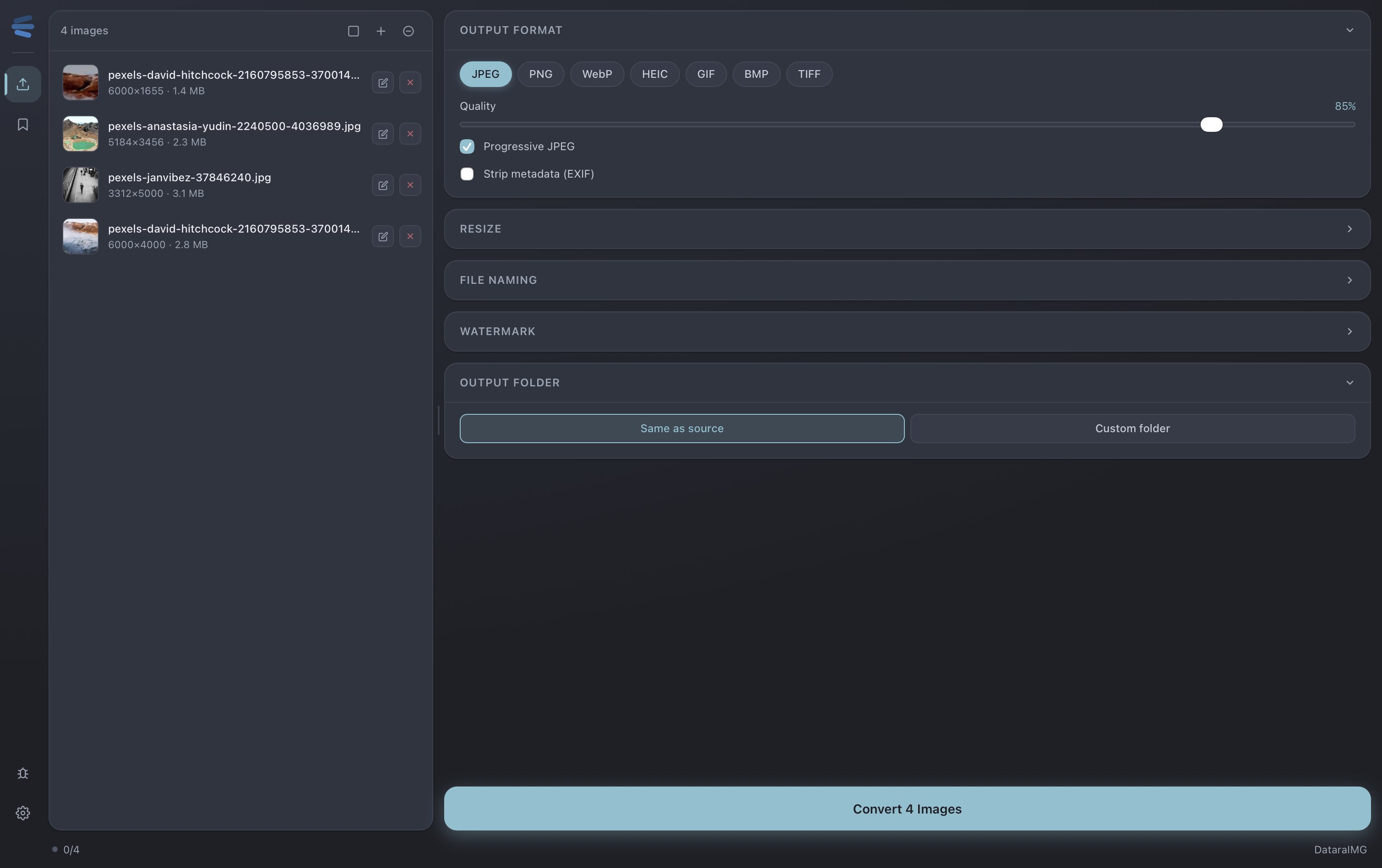
DataraIMG is an image format converter, resizer, and batch filename renaming tool built for people who work with web assets regularly. It allows you to take one or many images and quickly convert them into common formats such as JPEG, PNG, WebP, HEIC, GIF, BMP, and TIFF, while also applying resizing rules and filename patterns as part of the same workflow. Instead of moving between multiple online tools, desktop utilities, file explorers, and manual rename steps, DataraIMG brings the core workflow into one focused interface.
For web developers, this matters because image handling is rarely just about changing a file type. A set of raw images may need to become WebP for performance, JPEG for compatibility, or PNG where transparency is required. The same files may also need to be resized to fit within a maximum width or height, compressed to a sensible quality level, stripped of metadata, or renamed so they follow a clean structure before being uploaded into a project. DataraIMG is designed around that practical reality, where conversion, optimisation, resizing, and naming are not separate tasks but part of the same production process.
The first release focuses on the essentials. You can choose the output format, adjust image quality, enable progressive JPEG output, strip EXIF metadata, resize images by defined dimensions, and apply file naming rules that make batch processing significantly easier. The filename tools allow you to rename files, add prefixes and suffixes, replace parts of filenames, and create cleaner output names that are easier to manage in web projects, asset folders, CMS uploads, and deployment workflows.
This is especially useful when dealing with client assets, where files often arrive with inconsistent names, oversized dimensions, unnecessary metadata, or formats that are not ideal for the web. Rather than manually editing each file or relying on a collection of disconnected tools, DataraIMG gives developers and site builders a simple way to prepare images properly before they reach the website.
DataraIMG also fits into the broader direction of Datara Studio. Our goal is not to build another bloated creative suite or generic productivity app. We are building a set of focused tools for developers, technical teams, and digital operators who want practical software that helps them move faster without giving up control. DataraDB focuses on database workflows, DataraSSH provides a free SSH and server access tool, DataraAPI is planned for API testing and development workflows, and DataraIMG now extends the suite into the web development asset pipeline.
The common thread across the Datara Studio suite is workflow. Developers do not work in isolated boxes. They move between databases, servers, APIs, assets, environments, deployments, clients, and content. DataraIMG exists because image preparation is one of those recurring operational tasks that sits inside real web delivery work, and it deserves a clean, reliable tool rather than a slow manual process.
We are releasing DataraIMG as a free tool because we believe small, useful developer utilities should be accessible. Not every tool needs to become a subscription. Not every workflow improvement needs to sit behind a paywall. Sometimes a tool should simply do its job well, save time, and become part of the working rhythm of a developer, designer, agency, or website owner.
DataraIMG is now part of the Datara Studio tool suite and will continue to evolve based on real-world usage and feedback. The first version is deliberately focused: convert images, resize them, clean up filenames, and prepare web-ready output quickly. From here, we will continue refining the workflow, improving batch handling, and expanding the tool in ways that make sense for developers and web teams.
You can learn more about DataraIMG and the wider Datara Studio suite at: