Built with Go — not Electron
Convert any image, instantly
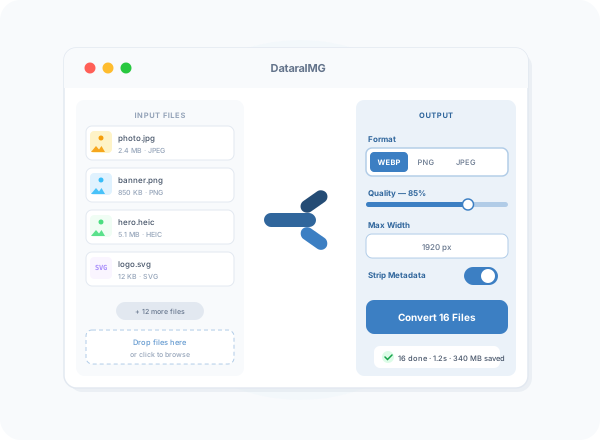
DataraIMG is a fast, native image converter for macOS and Windows. Drag in any file — JPEG, PNG, WEBP, HEIC, AVIF, SVG, GIF — and convert it to any other format in seconds, individually or in bulk.
Everything you need to convert images
8 Formats In, 8 Formats Out
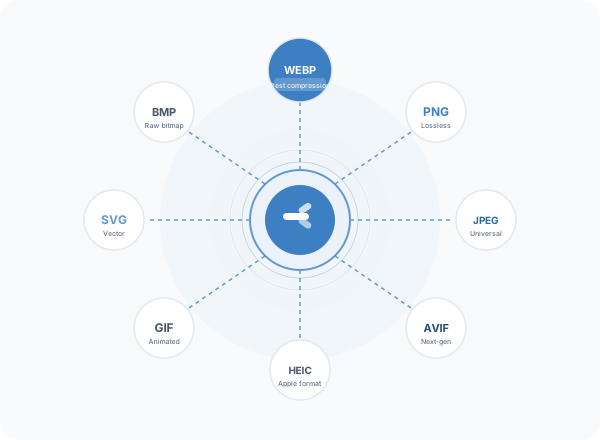
Convert between JPEG, PNG, WEBP, AVIF, HEIC, GIF, SVG, and BMP. Every combination works — no format restrictions.
Batch Conversion
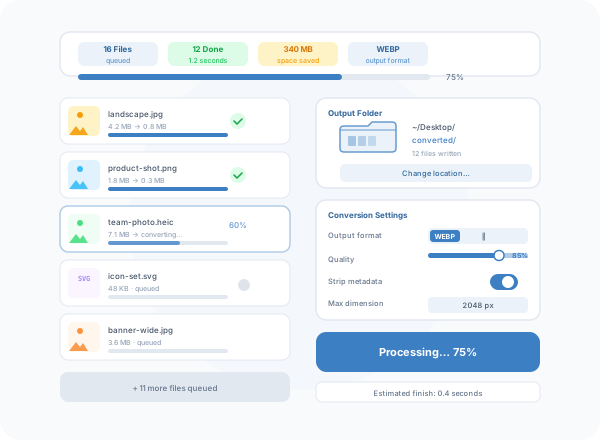
Drop an entire folder and convert every image at once. DataraIMG processes files in parallel and shows live progress for each one.
Quality Control
Fine-tune output quality with a simple slider. DataraIMG picks sensible defaults so most jobs need zero configuration.
Resize & Fit
Set a maximum width, height, or longest edge. Images resize proportionally — no distortion, no cropping unless you want it.
Strip Metadata
Remove EXIF data, GPS coordinates, and embedded profiles in one toggle. Perfect for web publishing and privacy.
Native Performance
Built with Go and Wails — not Electron. Converts a hundred images in the time other tools take to open. Launches in under a second.
Simple by Design
Drop files. Pick a format. Done.
DataraIMG's interface is built around one idea: get out of your way. Drag any image or folder onto the window, choose your output format and quality, and hit Convert. No import wizards, no project files, no configuration screens.
- Drag-and-drop from Finder or File Explorer
- Processes entire folders recursively
- Live progress bar per file and overall
- Opens output folder when complete
- Remembers your last settings
Format Coverage
Eight formats, every direction
Whether you're converting iPhone photos from HEIC to JPEG for a client, generating WEBP thumbnails for a website, or exporting PNG assets to AVIF for maximum compression — DataraIMG handles it without plugins or dependencies.
- JPEG → WEBP, PNG, AVIF, BMP
- HEIC → JPEG, PNG, WEBP (no Apple tools required)
- PNG → WEBP, AVIF, JPEG, GIF
- SVG → PNG at any resolution
- AVIF → JPEG, PNG for compatibility
DataraIMG by the numbers
8
Supported formats
<1s
Launch time
85%
Average size reduction
∞
Files per batch