Tunnel anything. Connect to everything.
DataraSSH takes the complexity out of SSH tunnels. Save forwarding rules per host, auto-start on connect, and watch which tunnels are live — all without touching a config file.
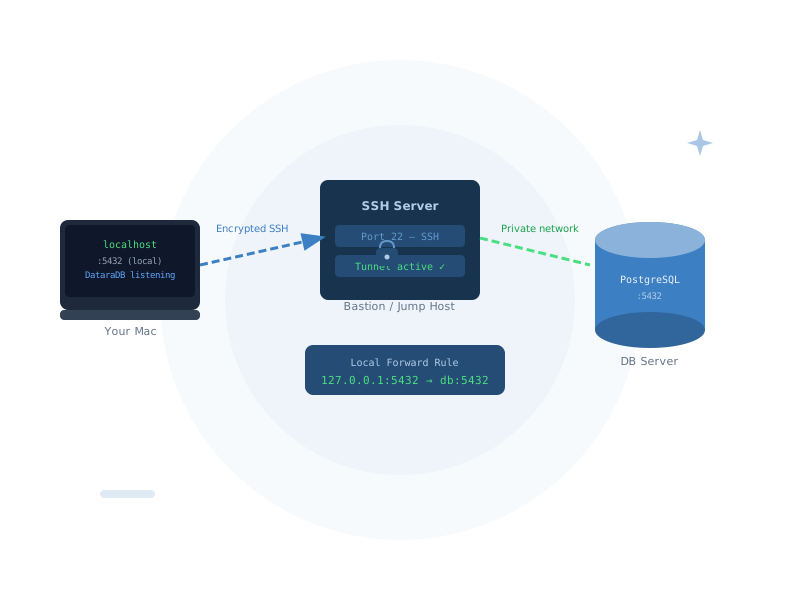
The forwarding features you actually need
Local Port Forwarding
Remote Port Forwarding
Saved Rules Per Host
Auto-Start on Connect
Live Active Forward View
Jump / Bastion Support
Access private databases without a VPN
The most common use case: your database server isn't publicly accessible. With DataraSSH local port forwarding, bind 127.0.0.1:5432 on your machine through the SSH connection to the database. Your database client connects to localhost — DataraSSH handles everything else.
- Connect DataraDB to private PostgreSQL, MySQL, or Redis via SSH tunnel
- No VPN required — just an SSH connection to any accessible server
- DataraSSH + DataraDB integration: DataraDB reads your SSH host list automatically
- Tunnel rules saved permanently — set once, use every session
- Auto-start ensures your tunnel is ready before you need it
DataraDB integration — tunnels without the setup
DataraSSH and DataraDB are built to work together. DataraDB can query DataraSSH's local API to read your saved SSH host list — so you can set up a tunnelled database connection without re-entering host details you've already saved in DataraSSH.
- DataraSSH runs a secure local API on 127.0.0.1:47321
- DataraDB reads your SSH host list automatically
- HMAC-SHA256 secured — no passwords or passphrases ever exposed
- Enable or disable the integration from settings with one toggle
- Zero extra configuration required on either side
One-time setup. Zero-effort every day.
Your tunnels, always ready.
DataraSSH is free forever. Set up your first port forwarding rule in under a minute.
Download DataraSSH — Free Next: Security →