DataraIMG 2 · Roadmap

Every image your site needs, from one drop.

DataraIMG 2 makes responsive image sets, icons and social crops, and shrinks files to the size you ask for, all on your own machine.
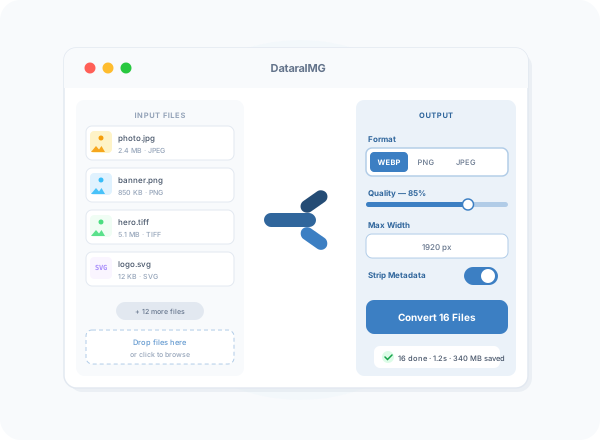
Every image your site needs, from one drop.
Leading the launch v2.0

Web asset export

Drop in one image and choose what you need. DataraIMG creates the responsive sizes with the srcset HTML ready to paste, a full favicon and app icon set, and crops for each social network. Every file lands in a tidy folder.

The DataraIMG 2 roadmap

What's coming to DataraIMG, and how firm each part is.

v2.0 Ships with the launch

Coming in DataraIMG 2.0

The features that ship with the DataraIMG 2 launch.

Web asset export

Responsive image sets with the HTML snippet, favicons and app icons in every size, and social crops, from one source image.

Compress to a target size

Say “under 200 KB” and DataraIMG finds the best quality that fits.

Before-and-after compare

Drag a slider across the original and the result to check quality before you save.

AVIF, HEIC and JPEG XL

Open iPhone photos directly and save to the newest, smallest web formats.
v2.x Planned for point releases

Coming after launch

Planned for point releases after 2.0, with no dates yet.

Watch folders

Drop files in a folder and they come out converted with your preset, without opening the app.

Right-click in Finder and Explorer

Run any preset from the file's right-click menu.

Smart crop

Crops keep faces and the main subject in frame automatically.
Exploring Being considered — no commitment

Exploring

Ideas we're considering. Nothing here is promised — your feedback decides what moves up.

Background removal and upscaling

Remove backgrounds and enlarge small images on your own machine. Nothing is uploaded.

RAW and PDF input

Convert camera RAW files and PDF pages with the same presets.
Tell us which of these matter to you

Better together

DataraIMG 2 joins the rest of the Datara suite, which bigger single-purpose tools can't offer.

v2.x

Suite command palette

One shortcut finds any preset, connection, host or log source across every Datara app you have installed.
v2.x

Choose your AI provider

When AI features arrive in DataraIMG, use OpenAI, Claude or a local model through Ollama, and see exactly what goes out.

Built on what DataraIMG already does

Batch conversion to JPG, PNG, WebP, GIF, BMP and TIFF; resize modes; crop and colour adjustments; watermarks; naming patterns; metadata stripping; and presets. Version 2 builds on all of it.

Explore Today's Features See Pricing

Help shape DataraIMG 2

Tell us what matters most

The Exploring list is where your vote counts most. Tell us what you'd use, and what's missing.